A short SQL tutorial for people to practice simple SQL commands
- A text editor.(Brackets,Atom,Sublime, etc)
- Xampp *Windows, Linux and macOS: -https://www.apachefriends.org/index.html *Secure your XAMPP environment: - With XAMPP running on PC, visit http://localhost/ - With XAMPP running on Mac, visit http://localhost:8080/ - Checkout the FAQs - Checkout PHPInfo - Checkout the other documentation - With XAMPP running, visit http://localhost/dashboard/docs/reset-mysql-password.html and follow the instructions to change the MySQL/MariaDB admin user root password (this will also secure PhpMyAdmin) take a screenshot of your output named xampp-secure.gif - Put the password(s) somewhere safe (e.g. a password manager) and/or remember them. *PHPMyAdmin may give you an error about logging in without a password. if it does, we need to edit the config.inc.php file in the phpMyAdmin folder of the webserver. for the pc, the file is located in C:\xampp\phpMyAdmin. for the Mac using XAMPP with the VM its a bit more complicated. From the XAMPP control panel, open up a terminal session from the general tab navigate to /opt/lampp/phpmyadmin type: chmod 777 config.inc.php From the Ccontrol panel, mount and Explore from the Volumes tab - this will open finder in the lampp folder Now, edit the config.inc.php file in the phpMyAdmin folder Back in the terminal enter: chmod 644 config.inc.php refresh your localhost:8080/phpmyadmin page
-
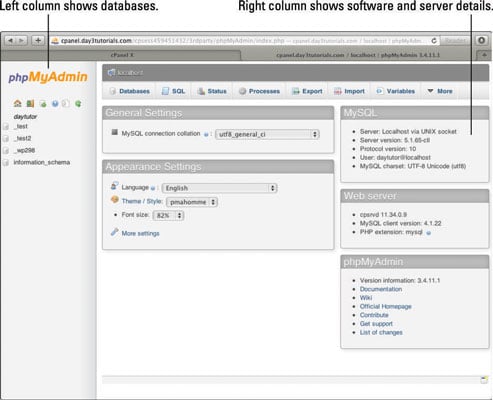
After Xampp is installed open the application and run Apache and MySQl 2.While step 1 is running, in your prefered browser type in '''http://localhost/phpmyadmin/''' Should look like:
-
Create a new database by clicking on the new button on the left panel. -Give your database the name Movie, find and use utf8_unicode_ci in the dropbox next to the name textbox
-
Create a table
-
Option 1: Use the PhpMyAdmin GUI
- On the Structure tab give your table the name movies, with 3 columns
- Column 1: Name: MovieID Type: INT INDEX: PRIMARY CHECK A_I box Column 2: Name: MovieTitle Type:VARCHAR CHECK Column 3: Name: MovieYear Type: INT
- Save your Table
-
Option 2: Import the MovieTable file
- Go to the import tab and import the MovieTable.SQL
-
-
Practice SQL Commands
- Go to your table name, click on it.
- You should be able to see the SQL tab.
- Practice inserting, updating and deleting Check the commandExamples.SQL file for examples.
-
Checkout how to implement SQL with PHP
- Go to the Student Course Management folder
- Look at code.
- For info to serve the PHP pages https://www.techwalla.com/articles/how-to-run-a-php-file-in-xampp