





Q1View is a Windows toolkit for engineers who need to look at the actual pixels — raw frame buffers, codec output, decoded images, and the small visual differences that ordinary media players gloss over.
Download from Microsoft Store | Download latest release | User guide | Development guide
Q1View is built for people whose work depends on what individual pixels look like and how two outputs differ — not for browsing a photo library.
- Codec and video engineers validating encoder/decoder output against a reference, frame by frame.
- Imaging engineers verifying camera pipelines, color-space conversions, and ISP tuning against raw buffer dumps.
- Computer vision engineers comparing pre- and post-processing stages or inspecting model input/output frames.
- QA and validation engineers confirming regressions, picking out off-by-one pixel shifts, and checking timing behavior on real material.
- Researchers stepping through experiment outputs and capturing exact pixel values for reports.
- Inspect a raw YUV or RGB dump at any subsampling or bit depth, including odd-width sources, and read source-native channel values at the cursor.
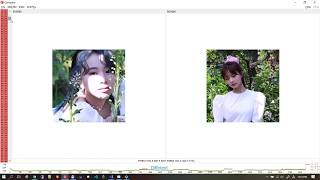
- Compare a reference image against a processed result with PSNR and SSIM overlaid and a pink pixel-diff highlight showing exactly where they disagree.
- Step through an image sequence in a folder (
frame_001.png…frame_100.png) or a video, with synchronized navigation across two to four sources. - Pull a clipboard screenshot in and check pixel coordinates, hex values, and small color drifts.
- Drive two Viewer windows in sync to compare different decodes of the same source while panning and zooming as one.
Q1View is not intended to manage photo libraries or replace a consumer video player. It is focused on codec development, imaging validation, and quick frame-level investigation.
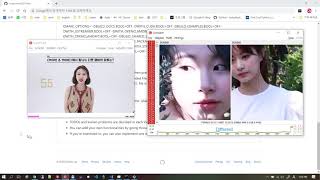
Open an image, raw dump, sequence, or video; zoom down to pixels, inspect coordinates and values, step through frames, or link multiple Viewer windows.

Open two to four sources side by side and see a visual difference together with objective similarity measurements.

Get Q1View from the Microsoft Store for automatic background updates and simple installation:

Alternatively, get the latest Windows x64 build from the GitHub Releases page.
- Installer:
Q1ViewSetup-x64.exe - Portable package:
Q1View-windows-x64.zip
The installer registers separate Start Menu entries for Q1View Viewer and Q1View Comparator.
- BMP, JPEG, PNG, TIFF, WebP
- HEIF, HEIC, HIF
- AVIF / AV1 still images
- Video files supported by the packaged OpenCV/FFmpeg runtime
- Raw frame dumps and clipboard images
- User Guide: screens, workflows, menus, and shortcuts
- Development Guide: local build and release packaging
- HEIF and AVIF Support: decoder dependency details
Q1View builds with Visual Studio 2019 or newer on Windows x64.
msbuild Viewer\Viewer.sln /m /restore /p:Configuration=Release /p:Platform=x64
msbuild Comparator\Comparator.sln /m /restore /p:Configuration=Release /p:Platform=x64
See the Development Guide for dependencies, packaging, and release assets.
| Intro | Viewer | Comparator |
|---|---|---|
 |
 |
 |