Owner-scoped GitOps for Nginx Proxy Manager
Validate desired-state YAML, plan safe owner-scoped changes, apply clean reconciles, and adopt existing NPM resources only when you ask for it.





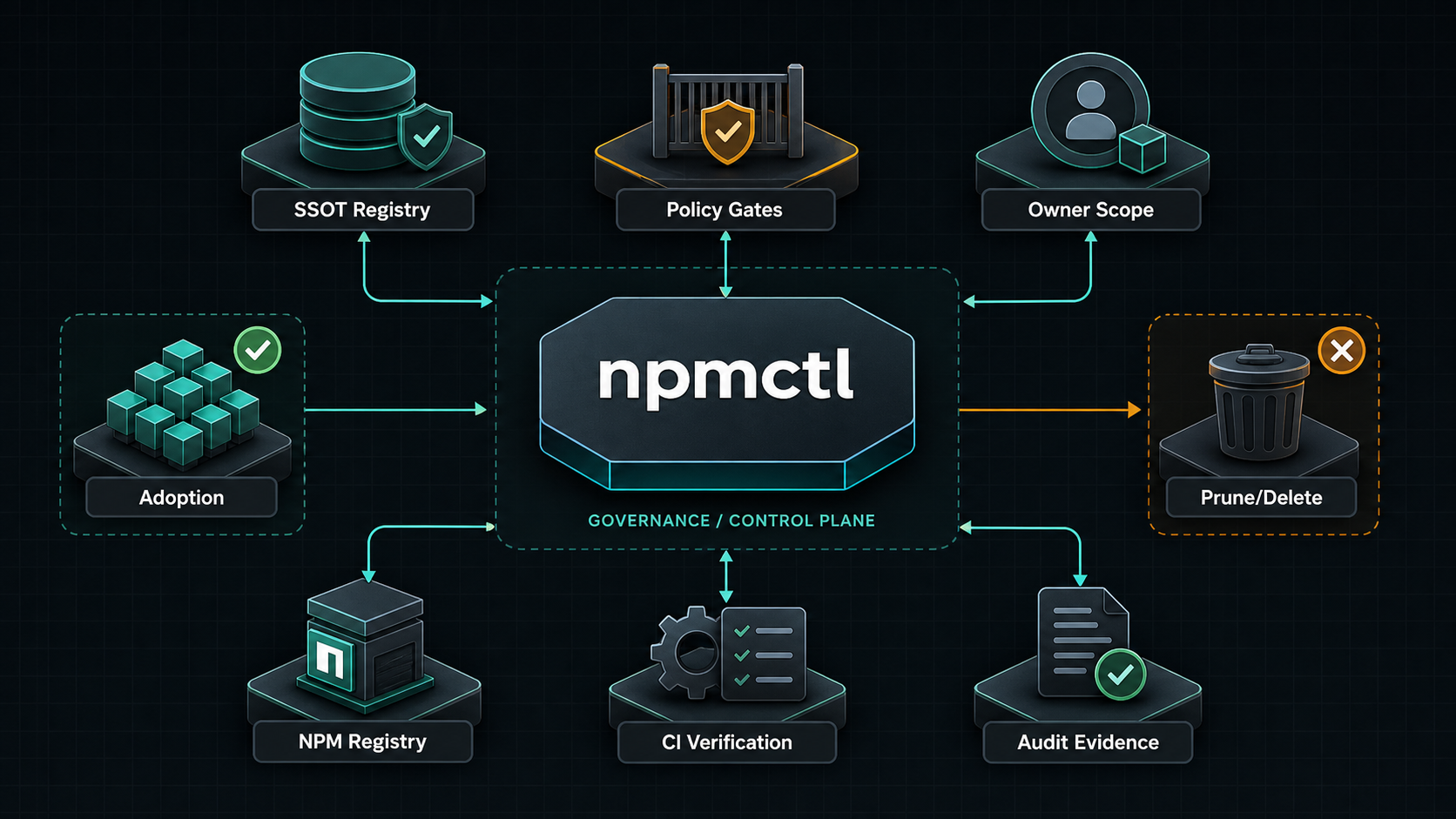
npmctl is an owner-scoped GitOps controller for Nginx Proxy Manager. It validates desired-state YAML, plans safe changes against a live NPM API, applies clean plans, and adopts unmanaged resources only when explicitly requested.
Answer: npmctl is a declarative controller for Nginx Proxy Manager that turns YAML desired state into safe owner-scoped plans, applies clean reconciles, and blocks unsafe mutations before they hit production.
Answer: npmctl replaces manual NPM clicking and brittle API scripts with repeatable plan/apply/adopt workflows for proxy hosts, certificates, access lists, and related resources.
Answer: No. npmctl treats NPM resources as owner-scoped, refuses to mutate foreign-owned resources, and requires explicit adoption before unmanaged resources come under npmctl control.
Answer: npmctl treats certificates as declarative resources in desired state. Issuance happens when a desired certificate must be created, and rotation is controlled through reconcile policy rather than implicit side effects during unrelated repair work.
Answer: Yes. npmctl adopt is the explicit path for attaching npmctl ownership metadata to compatible unmanaged resources so later plans and applies remain conservative and traceable.
It manages:
- Proxy hosts
- SSL certificates
- Access lists
- Redirection hosts
- Dead hosts
- Streams
- Users
- Settings
- Provider-backed DNS records
It also provides read-only audit log reporting, operator diagnostics, compliance artifact generation, and plugin contracts for future custom resource and certificate and DNS providers.
- Every managed resource must carry
meta.managed_by: npmctl,meta.owner, andmeta.resource_id. --ownerlimits planning and mutation to one owner scope.- Foreign-owned resources are immutable to the current owner.
- Unmanaged resources are not changed by
planorapply; useadoptto attach npmctl metadata. - Deletes are opt-in with
--prune-owned. - API operations are gated by the NPM OpenAPI schema and fail closed when a required endpoint is unavailable.
- Python
3.10,3.11,3.12,3.13, or3.14 - Access to a Nginx Proxy Manager API, usually
http://host:81/api - NPM admin credentials or an account with permissions for the resources you want to manage
- Optional for local development: Docker and Docker Compose
Install the published CLI with pipx:
pipx install npmctl
npmctl --version
npmctl --help
Install with uv as a tool:
uv tool install npmctl
npmctl --help
Install from a local checkout:
git clone https://github.com/groupsum/npmctl.git
cd npmctl
uv sync
uv run npmctl --help
Run directly from the workspace while developing:
uv run npmctl validate examples/desired-state
uv run pytestYou can pass API credentials on every command:
npmctl --base-url http://127.0.0.1:81/api --identity admin@example.com --secret changeme healthFor regular use, set environment variables:
export NPM_BASE_URL=http://127.0.0.1:81/api
export NPM_IDENTITY=admin@example.com
export NPM_SECRET=changeme
export NPM_TIMEOUT_S=15
PowerShell:
$env:NPM_BASE_URL = "http://127.0.0.1:81/api"
$env:NPM_IDENTITY = "admin@example.com"
$env:NPM_SECRET = "changeme"
$env:NPM_TIMEOUT_S = "15"
Then verify connectivity:
npmctl healthThe repo includes a SQLite-backed NPM stack for local testing:
docker compose -f deploy/npm/docker-compose.yml up -d
export NPM_BASE_URL=http://127.0.0.1:81/api
export NPM_IDENTITY=admin@example.com
export NPM_SECRET=changeme
npmctl health
For details, see deploy/npm/README.md.
A minimal proxy host:
apiVersion: npmctl.com/v1
schemaVersion: 2
proxy_hosts:
  - domain_names: [app.example.com]
    forward_scheme: http
    forward_host: app
    forward_port: 3000
    meta:
      managed_by: npmctl
      owner: workload-a
      resource_id: proxy.app
A proxy host with certificate and access-list references:
apiVersion: npmctl.com/v1
schemaVersion: 2
certificates:
  - name: wildcard-example
    domain_names: ["*.example.com", example.com]
    certificate_type: letsencrypt
    api_payload:
      provider: letsencrypt
    meta:
      managed_by: npmctl
      owner: workload-a
      resource_id: cert.wildcard-example
access_lists:
  - name: private-admins
    api_payload:
      satisfy_any: 0
      items: []
      clients: []
    meta:
      managed_by: npmctl
      owner: workload-a
      resource_id: acl.private-admins
proxy_hosts:
  - domain_names: [app.example.com]
    forward_scheme: http
    forward_host: app
    forward_port: 3000
    certificate_ref: cert.wildcard-example
    access_list_ref: acl.private-admins
    ssl_forced: 1
    http2_support: 1
    allow_websocket_upgrade: 1
    caching_enabled: 1
    block_exploits: 1
    meta:
      managed_by: npmctl
      owner: workload-a
      resource_id: proxy.app
More examples are in examples/desired-state.
Validate desired state without calling NPM:
npmctl validate examples/desired-state
npmctl --output json validate examples/desired-state
Check whether files need schema migration:
npmctl migrate examples/desired-state --check
npmctl migrate examples/desired-state --write
Fetch the live NPM OpenAPI schema:
npmctl schema fetch --write schemas/npm/live-openapi.jsonInspect endpoint capabilities from a schema file or from the live API:
npmctl schema capabilities --schema schemas/npm/2.10.4/openapi.json
npmctl schema capabilities
npmctl schema check
Plan owner-scoped changes:
npmctl plan examples/desired-state --owner workload-a
npmctl --output json plan examples/desired-state --owner workload-a
Apply a clean plan:
npmctl apply examples/desired-state --owner workload-aPreview the apply path without mutation:
npmctl apply examples/desired-state --owner workload-a --dry-runDelete owned resources that are no longer present in desired state:
npmctl apply examples/desired-state --owner workload-a --prune-ownedAdopt unmanaged matching resources by writing npmctl metadata:
npmctl adopt examples/desired-state --owner workload-aStrict adoption requires the unmanaged resource fields to match desired state. To allow field drift while attaching metadata:
npmctl adopt examples/desired-state --owner workload-a --allow-field-drift- Author YAML with explicit
meta.ownerandmeta.resource_id. - Run
npmctl validate. - Run
npmctl schema checkagainst the target NPM instance. - Run
npmctl plan --owner <owner>. - Review creates, updates, deletes, adopts, noops, and conflicts.
- Run
npmctl apply --owner <owner>only when the plan is clean. - Use
--prune-ownedonly when absent owned resources should be deleted.
0: success1: plan conflict2: usage, validation, or migration error3: API error4: endpoint capability error
Run the normal local checks:
uv sync
uv run ruff check .
uv run ruff format --check .
uv run pytest
uv build --package npmctl
Run real NPM E2E tests against the bundled CI stack:
docker compose -f deploy/npm/compose.ci.yml up -d
export NPMCTL_REAL_NPM=1
export NPM_BASE_URL=http://127.0.0.1:8181/api
export NPM_IDENTITY=admin@example.com
export NPM_SECRET=changeme
uv run pytest --no-cov -m npm packages/npmctl/tests/e2e
docker compose -f deploy/npm/compose.ci.yml down